

BlogPractical build guide
AI Coding Course for Non-Developers: Build a Working App Without Pretending the Code Is Magic
AI can turn a precise brief into working software surprisingly quickly. The durable skill is not accepting generated code—it is defining the product, inspecting changes, testing failure cases and knowing when a prototype needs an engineer.
 Vitalij Kolotikov 12 min read
Build-scope checker
How far should you take your first AI-built app?
Choose the closest scenario. The answer separates a learning prototype from software that needs production engineering.
You describe an app, an AI coding assistant creates files, and a working interface appears. That moment is real—and it can be genuinely empowering for somebody who has never written software.
It is also the moment when a weak AI coding course can teach the wrong lesson: if the screen looks finished, the product must be finished.
Software is more than its visible screen. It includes data, permissions, dependencies, failure handling, accessibility, security, deployment, backups and future changes. A valuable course lets a non-developer experience the speed of AI-assisted building while learning to control those invisible parts.
This guide gives you the full route from idea to a defensible deployment decision. You can use it to evaluate a course or structure your own first project.
What a non-developer can realistically build
A beginner can make substantial progress when the first application is deliberately small.
Good first projects include:
- a quote or pricing calculator with no payment processing;
- a private content approval board using fictional examples;
- a simple event planner or checklist;
- a searchable reference tool built from public documents;
- a read-only dashboard using a prepared dataset;
- an enquiry organiser that prepares drafts but sends nothing;
- a lightweight portfolio, directory or booking-request prototype.
The common pattern is one primary user, one main journey and a limited consequence when something fails.
Poor first projects include a marketplace, social network, medical decision tool, public chatbot with private data, payment system, authentication service or “all-in-one business platform”. These combine multiple hard problems before the learner has a reliable build-and-test loop.
Prototype, pilot and production are different states
Use the labels precisely.
| State | Purpose | Evidence needed | Suitable exposure |
|---|---|---|---|
| Prototype | Test whether the idea and journey make sense | Clickable flow, example cases, known gaps | Creator or invited reviewers using fictional data |
| Controlled pilot | Observe usefulness in limited real work | Access rules, owner, tests, error log, manual fallback | Small approved group and bounded data |
| Production | Provide a dependable ongoing service | Security, privacy, accessibility, monitoring, backups, incident and maintenance routes | Intended live users and approved data |
AI can shorten the route to a prototype. It does not erase the gates between these states.
The current 2026 reality: vibe coding is a spectrum
The UK National Cyber Security Centre’s June 2026 article, The “vibe coding spectrum” approach to AI-assisted software development, offers a useful model. Move towards more autonomous AI building for disposable prototypes and low-exposure internal experiments; move towards more manual understanding and oversight for authentication, credentials, sensitive data and consequential systems.
This is more practical than arguing whether vibe coding is always good or always reckless. The right level of supervision follows the consequences.
Current Home Office engineering guidance for using AI applies the same fundamental expectations to AI-assisted work: human review before production, traceable changes, tests, approved tools and protection of restricted data. Your small project may not need government-level process, but the principles scale down well.
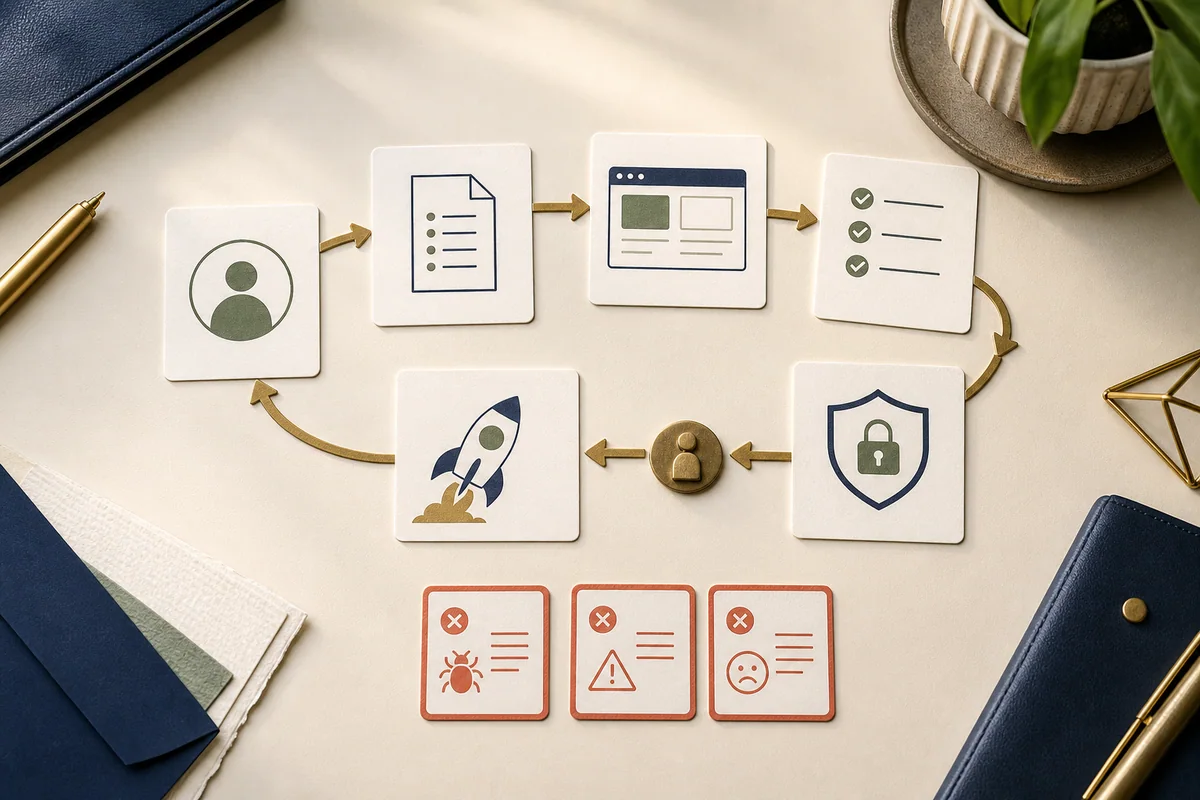
The eight-step AI app-building loop
The loop matters more than the brand of coding assistant.
1. Define the user and the moment
Write one sentence:
When [situation] occurs, [specific user] needs to [complete one job] so that [observable outcome] happens.
Avoid “an app for everyone who wants to be more productive”. Choose one person and one moment.
2. Write acceptance tests before features
An acceptance test describes behaviour, not appearance.
Given a quote with three valid line items,
when the user applies a 10% discount,
then the subtotal, discount and final total update correctly,
and the original item values remain unchanged.
Add failure cases:
- blank required input;
- invalid number or date;
- unusually long text;
- duplicate action;
- lost network connection;
- user without permission;
- refresh or back-button behaviour.
If you cannot describe the correct outcome, the AI cannot reliably infer it.
3. Choose the smallest architecture
A first project may need only browser-side code and local sample data. Do not add a database, user accounts, external APIs and payments because the assistant can generate them.
Ask the tool to explain the proposed parts in plain English:
- what runs in the browser;
- whether a server exists;
- where data is stored;
- which outside services are called;
- what secrets or credentials are needed;
- how the application is deployed;
- what would need maintenance.
Complexity is a liability until a requirement justifies it.
4. Build one vertical slice
A vertical slice is one complete user journey through the interface, logic and data. Build “create and review one quote”, not five beautiful pages with no working calculation.
Ask for one change at a time. Inspect the file list before and after. Run the app and the tests after each meaningful change.
5. Read the change, even if you cannot write it
You can learn to inspect structure before you are fluent in syntax.
Ask:
- Which files changed, and why?
- What assumptions did you make?
- Where is validation performed?
- What happens when the request fails?
- Did you add a package? Why is it necessary?
- Which test proves this behaviour?
- What should I manually verify?
Then open the files and connect the explanation to the actual change. Do not accept “done” as a review.
6. Test outside the happy path
Run the written acceptance tests yourself. Add automated tests where practical, but do not let the same assistant’s claim that its tests pass replace inspection.
Test keyboard navigation, labels, focus, colour contrast, mobile layout, slow connections and empty states. A course that treats accessibility as final polish is teaching product development backwards.
7. Review security and privacy
Before any live data or public user appears, check:
- no secret or API key is exposed in browser code or committed files;
- dependencies are real, current and necessary;
- inputs are validated and outputs are handled safely;
- permissions deny access by default;
- logs do not expose personal or confidential data;
- data collection is necessary and explained;
- backups, deletion and access removal have owners;
- build and deployment scripts contain no unexplained commands.
HMRC’s January 2026 guidelines for software developers using generative AI emphasise reliable source data, human oversight, transparency, privacy and a secure software development lifecycle. Although written for commercial tax software, it shows how quickly the standard rises when software affects regulated or sensitive work.
8. Make a deployment decision
Choose one:
- keep it as a private learning prototype;
- run a limited internal pilot;
- arrange an independent review before public release;
- stop and redesign;
- hand the specification and prototype to an experienced engineer.
Deployment is not the automatic final lesson. Sometimes the most competent decision is not to publish.
A specification template that an AI coding tool can use
Copy this into a document before opening the coding assistant.
Product name:
Primary user:
User problem and trigger:
One-sentence outcome:

Version 1 includes:
Version 1 explicitly excludes:

Main user journey:
1.
2.
3.

Data fields:
Where data comes from:
Where data may be stored:
Data that must never be used:

Five acceptance tests:
1.
2.
3.
4.
5.

Failure and empty states:
Accessibility requirements:
Security and privacy constraints:
Deployment audience:
Manual fallback:
Owner after launch:
If the AI suggests a feature outside “version 1 includes”, place it in a later list. Do not let conversational momentum rewrite the scope.
Prompt patterns for safer building
Ask for a plan before code
Read the specification below. Do not write or edit code yet.
Return:
1. the smallest architecture that meets it;
2. assumptions and unresolved questions;
3. the proposed file structure;
4. security, privacy and accessibility risks;
5. a build sequence in changes small enough to test independently.
Prefer fewer dependencies. Mark anything that requires a qualified production review.
Constrain each implementation step
Implement only acceptance test 2.
Before editing, list the files you expect to change.
Do not add dependencies or alter deployment configuration without asking.
After editing, explain each change, run the relevant tests and state what I must verify manually.
Diagnose instead of repeatedly rewriting
The expected behaviour is [x]. The actual behaviour is [y].
Do not change code yet.
Identify the most likely causes, the evidence for each and the smallest diagnostic check.
After I provide the result, propose one targeted fix and a regression test.
This reduces the common beginner pattern of asking the system to “fix everything”, receiving a large rewrite and losing track of which change solved—or created—the problem.
Version control is a safety skill, not developer ceremony
Learn four actions early:
- see which files changed;
- review the difference;
- save a named working version;
- return to it when the next change fails.
Create a checkpoint after each tested slice. A working app should never exist only in the assistant’s chat history or an unsaved browser workspace.
Do not paste commands you do not understand into a privileged terminal. Ask what each command reads, writes, installs or deletes, and run it only in the intended project.
Dependencies and invented packages
AI coding tools may recommend an unnecessary, outdated or incorrectly named package. Before adding one:
- check the official registry and documentation;
- inspect maintenance and security status;
- confirm the licence fits your use;
- prefer built-in platform capability where reasonable;
- run the ecosystem’s dependency audit;
- record why the package exists.
The OWASP Secure Coding with AI Cheat Sheet gives current practical guidance on hallucinated packages, outdated dependencies, rules files, test manipulation and AI changes to build or deployment infrastructure.
Three first-project blueprints
Blueprint 1: quote calculator
Journey: enter fixed service options, see a transparent subtotal and export a draft summary.
Learn: form state, calculation, validation, print layout and tests.
Keep out: payment, customer accounts and tax advice. Make clear that the output is a draft subject to review.
Blueprint 2: content approval board
Journey: create an item, assign a status, add feedback and filter the board.
Learn: components, data structure, state changes, empty states and simple persistence.
Keep out: confidential campaigns and multi-company permissions until access has been designed and reviewed.
Blueprint 3: public-data explorer
Journey: load a prepared public dataset, filter it and view a small chart plus the underlying values.
Learn: data cleaning, loading states, visualisation, source attribution and numerical tests.
Keep out: personal data, live scraping and claims the source cannot support.
What a practical AI coding course should teach
A useful curriculum follows the product lifecycle:
- problem selection and scope;
- user journey and acceptance tests;
- architecture in plain English;
- prompting and context management;
- file structure and version control;
- incremental implementation;
- debugging and regression tests;
- responsive design and accessibility;
- data, permissions and security basics;
- deployment, monitoring, backups and maintenance;
- documentation and handover;
- where professional engineering is required.
Be cautious if most of the syllabus is a tour of tool interfaces. Tools will change. Product definition, test design and responsibility transfer.
How to assess the learner—not just the app
At the end, ask the learner to demonstrate:
- the user problem and explicit scope;
- the main journey without instructor help;
- a failed test and how it was diagnosed;
- the files and data flow in plain English;
- how secrets and access are handled;
- how to return to a working version;
- what is not safe or ready for production;
- the maintenance owner and next review.
A polished interface generated during class is weak evidence if the learner cannot explain any of these.
A four-week self-study route
Week 1: specify
Choose one blueprint, interview its intended user, write the scope and five tests. Make a paper or clickable interface with no live data.
Week 2: build one journey
Set up version control. Ask for the smallest architecture. Build one vertical slice in small tested changes.
Week 3: break and improve
Run edge cases, keyboard and mobile tests. Keep an error ledger. Review dependencies, validation, secrets and data boundaries.
Week 4: decide and document
Create the operating note and demo the app to a new person. Keep it private, pilot it with controls, request specialist review or stop. Record why.
This is slower than “build an app in ten minutes” and far more useful.
When to involve an experienced engineer
Bring in qualified help before public release when the app involves:
- login, authorisation or multiple permission levels;
- personal, confidential, payment or health data;
- purchases, refunds or financial calculations;
- safety, legal, employment or other material decisions;
- third-party APIs with write access;
- high availability or many users;
- unfamiliar infrastructure or deployment scripts;
- a security incident or unexplained dependency.
The engineer should receive the specification, threat and failure cases, test set, dependency list and known limitations. Your course work becomes useful handover material rather than a disposable demo.
Your next build
Use the scope checker above, then select one project that stays within its recommendation. Write the five acceptance tests before prompting for code.
If you want to build with guidance while understanding each decision, see the AI coding course in London. Complete beginners can also start with the broader AI courses for beginners roadmap before choosing a coding-focused path.
Frequently asked questions
Can a complete beginner build an app with AI?
Yes, a complete beginner can build a small prototype or narrowly scoped internal tool with guided use of an AI coding assistant. The safest starting project uses fictional data, one clear user journey and reversible actions. Public apps, authentication, payments and sensitive data require deeper engineering, security, privacy and operational work.
Do I need to learn programming for an AI coding course?
You do not need traditional programming experience to start, but you do need to learn enough structure to inspect what the assistant changes: files, components, data flow, errors, tests, version control and deployment. The aim is informed control, not memorising syntax before building or blindly trusting generated code.
What should I build in my first AI coding course?
Choose a small tool with one main user and one complete journey, such as a quote calculator, content approval board, enquiry organiser, event planner or read-only reporting dashboard. Avoid beginning with a social network, marketplace, medical product, payment system or application that stores sensitive personal data.
How long does it take to build an app with AI?
A clickable prototype can appear within a session, but visual speed is not the same as a dependable app. A useful learning project also needs a specification, representative tests, error handling, accessibility checks, security review, deployment decisions and documentation. Time depends far more on scope and risk than on how quickly the first screen is generated.
What is vibe coding?
Vibe coding generally means describing desired software in natural language and allowing an AI coding system to produce much of the implementation. It is suitable for exploration and low-risk prototypes when used deliberately. As exposure, sensitive data and consequences increase, human understanding, review, testing and specialist assurance must increase too.
Is AI-generated code secure?
It can be secure, insecure or simply inappropriate, just like human-written code. AI tools can suggest outdated or invented packages, expose secrets, misunderstand access rules or produce tests that miss the real failure. Generated changes must pass the same review, dependency, security and deployment controls as other code, with a qualified human accountable for production use.